Setup
git clone https://github.com/KxSystems/kx-vscode.git
npm install
Recommended Extensions
Scripts
Run these with npm run scriptName
| Script | Description |
|---|---|
update-deps |
Update dependencies to latest patch version |
format |
Format all ts files |
lint |
Lint all ts files |
package |
Produce vsix |
test |
Perform Unit Tests |
test:e2e |
Perform End to End Tests |
coverage |
Produce coverage reports |
q-test |
Perform q Tests |
Configuring SonarQube
Once you’ve installed the SonarQube Extension, add the KX SonarQube server https://sonarqube.dl.kx.com, and it will lint as you type, so you don’t need to wait for the github pipeline to discover issues.
Ctrl + Shift + P -> “SonarQube: Analyze Current File with SonarQube” will give you a a detailed summary of any issues in a file.
SonarQube results can be viewed at https://sonarqube.dl.kx.com/dashboard?branch=dev&id=kxvscode
Debugging
Pressing F5 with a file in the extension open will launch a VSCode instance running the extension built from source, with the debugger open in the original VSCode instance.
On VS Code 1.139, whose bundled JavaScript debugger (js-debug 1.117) cannot
attach on Node 24.20
(vscode-js-debug#2416),
F5 leaves the new instance stopped on its first line and reports “Extension
host did not start in 10 seconds”. Run Without Debugging (Ctrl+F5) still works.
To debug, install
JavaScript Debugger (Nightly)
and disable the built-in one (search the extensions for
@builtin @id:ms-vscode.js-debug), then reload the window. Revert both once VS
Code ships js-debug 1.140 or later.
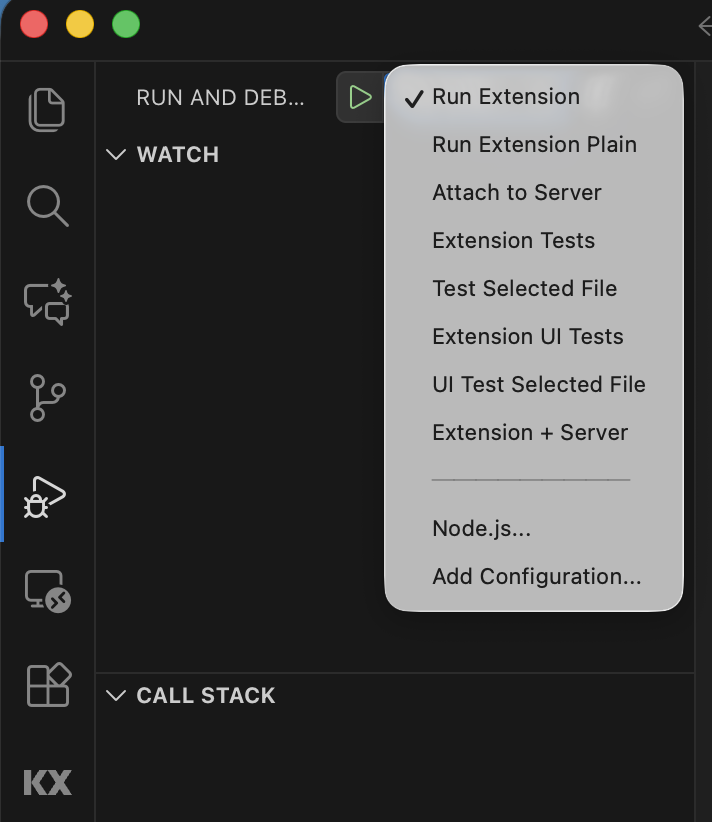
Extension Unit Tests can be debugged by selecting Extension Tests target from run and debug tab.
Testing will stop at any breakpoint set in test or source file.
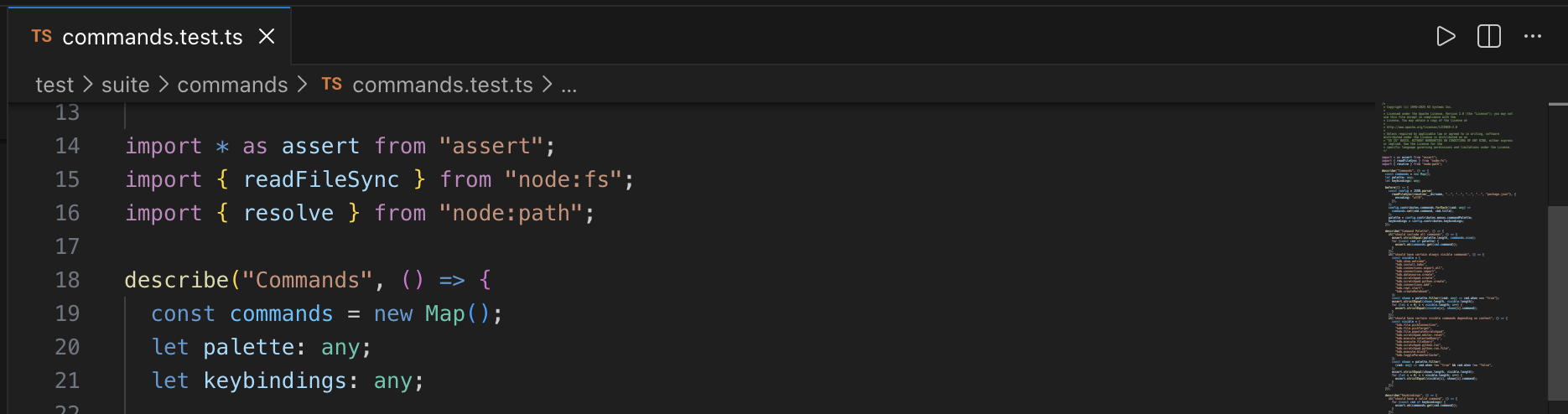
Single test file can also be debugged by clicking run button from the editor toolbar:
End to end Testing
npm run test:e2e opens a second VS Code window on
test/e2e/workspace
and drives the extension the way a user does: real commands, real workspace
settings, the real language server. Nothing is stubbed.
The test files sit directly in test/e2e; everything they are built out of — the stand-ins, the fixtures, the helpers that drive VS Code — lives in test/e2e/utils.
Stand-ins take the place of everything outside the extension, and each records what it is sent, which is what the tests assert on:
fakeq/bin/q, spawned by the REPL because the workspace pointskdb.qHomeDirectoryWorkspaceat it. It answers the REPL handshake and writes a.transcript.lognext to the directory each REPL runs in.qserver.ts, a kdb+ IPC server the connection tests run in process. It uses the same codec asnode-q, and the suite adds and removes its connection itself, so no connection has to be prepared beforehand.insightsServer.ts, a KDB Insights instance, over HTTPS with a self-signed certificate generated intotest/e2e/certs/on the first run — Insights connections must behttps://, and a certificate no CA vouches for is what the connection’s “insecure” flag exists for. It answers the OAuth code flow, the configuration, meta, scratchpad and service gateway endpoints, and the scratchpad log websocket. Which endpoints the extension picks depends on the version the instance reports, soversionandqueryEnvironmentsare settings on it and a test can stand up an older instance by changing them.- the browser the OAuth code flow opens, replaced in
insights.tsby a function that walks the authorization redirect back to the extension’s own local server. It exists because there is no one in a test window to open the URL — the code flow, the token request and the certificate handling all still run for real. - the person a notification is addressed to, replaced in
prompt.ts. A notification’s buttons are drawn by the workbench and no API presses one, so a command that asks before it acts could otherwise not be driven to either answer. Every notification is recorded, and one is answered only when a test has said what to answer it with. - the person a dialog is addressed to, replaced in
dialog.ts— the file dialogs a command opens to read or write a file, and the quick picks it asks a question through. These are drawn by the workbench too, and no API hands one a path, so the connections panel’s import and export could otherwise not be driven at all. Each is recorded with the options it was raised with, so a test can assert what the user was offered as well as what was done with the answer. An unanswered quick pick is left to the workbench the way an unanswered notification is; an unanswered file dialog is answered as one closed without a choice, since nothing in a test window would dismiss it.
The last three replace a VS Code API rather than a process, and all of them stand in for the user rather than for anything the extension talks to.
What a tree view draws is the one thing these tests cannot reach: VS Code
exposes no API for another extension’s tree items, and the window loads the
bundled extension, so a test cannot reach the providers either. Tree contents
are covered in test/suite instead; what a tree item’s command does when it is
run is still driven from here, with the item the tree would hand it.
A webview’s content is out of reach for the same reason — it runs in an iframe,
and postMessage is the only way in. So a panel of the test’s own takes its
place: webview.ts mounts the component from the bundle the real page loads
(out/query.js for the query editor, out/webview.js for the rest) and drives
it from a script running inside the page, which reports what it found back over
that channel. The component, its shadow DOM and the controls it is built from
are all real; only the panel hosting them belongs to the test.
The workspace also turns off everything the workbench would otherwise put in
front of a test: files.simpleDialog.enable replaces the system file dialog
with a quick pick, so a dialog dialog.ts has not been told how to answer
leaves the window usable rather than blocking it behind a native sheet, and the
explorer.confirm* settings drop the confirmations the explorer raises before
it deletes or moves a file.
window.dialogStyle is deliberately not among them — it is application scoped,
so a workspace file cannot set it, and modal messages are answered through
prompt.ts rather than by their style.
Both suites can be debugged with the E2E Tests and E2E Test Selected File
targets in the run and debug tab.
These tests are macOS and Linux only for now: the REPL spawns q through
cmd.exe on Windows, which cannot run the extensionless stand-in.
q Testing
To run the tests non-interactively, you can just run npm run q-test and they will be run in the q-build container.
To run the tests interactively, you need to
- Install Python version 3.12 installed, as the tests rely on an old version of pykx that doesn’t support the latest Python
~/kx-vscode $ brew install python@3.12 ~/kx-vscode $ python3.12 -m venv venv ~/kx-vscode $ source venv/bin/activate - Install pykx by running the following. If you aren’t running the right Python version, PyKX 2.5 won’t be available. More detailed instructions are available here
~/kx-vscode $ zsh ./test/q/preTest.sh - kdb+ installed, with the
qexecutable in the system path - AxLibraries should be installed, according to its readme.
To debug the tests, create a file with a username and password to secure the q process, then start a q process using that authentication.
$ echo "myusername:mypassword" >> users.txt
$ q -u users.txt -p 1234
KDB-X 5.0 2026.01.22 Copyright (C) 1993-2026 Kx Systems
l64/ 16()core 15644MB myusername hostname 127.0.1.1 EXPIRE 2027.01.13 email@example.com

q)\l qcumber.q
q)\l test/q/main.q
You can now connect to the process on port 1234 and step through the tests
Python and matplotlib
Start a virtual environment
python3 -m venv ~/kx-vscode/venv
source venv/bin/activate
Then install matplotlib
pip install --upgrade matplotlib
and PyKX, following the steps here https://code.kx.com/pykx/getting-started/installing.html#1-install-kdb-x-python
Restart Extension Host
ctrl/⌘+r will restart extension host.
Dependencies
List outdated dependencies:
npm exec ncu
Releasing a new version
Let the doc writer, or the #docs channel if they’re unavailable, know that a release is about to go out so they can publish the docs concurrently.
Check out the branch to release, update the version number in package.json, then run
git tag v1.2.3
git push origin v1.2.3
Then, in the Actions tab, open the pipeline that was just created, and give manual approval once the action reaches that point. It can take 10 minutes for the version number to be updated in the extension marketplace, even after it updates the timestamp to reflect the new release.
Announce the release in #kx-product-releases, using the template
:rocket: VSCode Extension x.y.z has been released

https://github.com/KxSystems/kx-vscode/releases/tag/vX.Y.Z
https://marketplace.visualstudio.com/items?itemName=KX.kdb


vX.Y.Z
Release date: [Today's Date]

[The change log, which can be found by clicking the release [here](https://github.com/KxSystems/kx-vscode/tags)]